

CART
0
0
YOUR CART

Pay cash discounted price and save
Pay cash discounted price and save
EMI available for 12 months on regular price: ৳290,000
| Display | ||
| Others | Screen Size: 65 Inch in Diagonal Display Backlight: D-LED Backlight Native Resolution: 3,840 x 2,160 (UHD) 4K Brightness: 400 cd/㎡ Contrast Ratio: 1200:1 or higher (depend on LCD brand) Viewing Angle (H x V): 178 x 178 Response Time: 8ms Operation Hours: 16Hr Orientation: Landscape |
|
| Touch System | ||
| Others | Touch Technology: Infrared Touch Touch Points: 20 touch points Writing Mode: Finger or any opaque object Accuracy: <2mm Response Time: 4~8ms Cursor Speed: 180 dot/s Connection Port: USB (full speed) Operating System: Windows/Linux/Mac/Android |
|
| Operating System | ||
| System Version | Hardware: 32GB ROM,4GB RAM Built-In Wi-Fi (Slot Type), Power Indicator, Local Key Operation, Android 11, Dual Operating System, Screen Share Application OPS-Kit: Built-In 11th Gen, Intel Core-i7 RAM: 8GB SSD: 256GB Remote Device Management Optional iMagic for Android and different software for Windows or customer can purchase a third-party MDM application to manage. Appearance Narrow bezel design with 8 front physical buttons, with abundant I/O ports On-Screen Annotation Sidebar Sidebar is with quick annotation, it enables teacher to write or annotate anything on screen any time. On-Screen Gesture Shal Whiteboard Software support gesture eraser, select, positioning, etc. On- Screen side bar support gesture menu to turn on light sensor for brightness adjustment or adjust sound, support switch the signal source to windows or android by sidebar. Screen Share Application Use Transcreen for screen share, support maximum 4 screens’ display at the same time. Environment Conditions Operation Temperature: 0 °C to 40 °C |
|
| Connectivity | ||
| Others | Input: Rear: 2*HDMI 2.0, 1*VGA, 1*VGA Audio in, 1*YPBPR, 3*USB 3.0, 1*TOUCH-USB, 1*RS232, 1*RJ45 IN, 1*AV IN, 1*MIC IN, 1*TF Card Slot, 1*OPS SLOT Front: 1*HDMI2.0, 1*TOUCH USB, 3*USB3.0 (auto connect when switch to Windows or Android), TYPE-C (Support Touch, Data, Video and Audio transfer) Output: 1*HDMI-out; 1*SPDIF, 1*Earphone, 1*RJ45 OUT, 1*AV OUT Wireless: Dual Band Wireless 802.11 ac, one for WIFI, one for hotspot. |
|
| Physical Specification | ||
| Power | AC (100~240) V-50/60HZ Standby Power<1W Rated Power<350W |
|
| Warranty | ||
| Warranty | 1-Year Brand Warranty | |
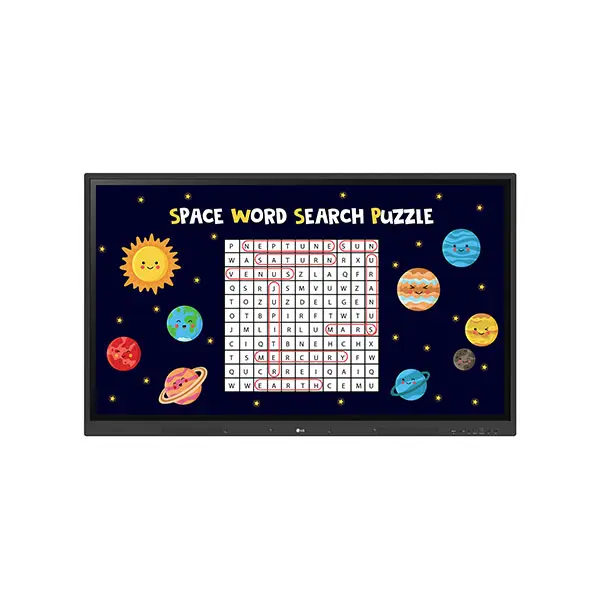
Transformative 65‑inch 4K UHD touch screen for modern classrooms and collaborative learning
The iBoard TE‑QS‑65 delivers an immersive 65‑inch 4K UHD display with responsive multi‑touch capabilities, designed specifically for education and collaborative environments. With intuitive touch interaction, built‑in digital tools, and easy connectivity, this interactive flat panel enhances teaching, group work, and presentations. Its advanced display technology ensures crisp visuals and smooth interaction for students and instructors alike.
The iBoard TE‑QS‑65 65‑inch 4K UHD Educational Interactive Flat Panel Display is engineered to transform traditional teaching into dynamic and interactive lessons. With its high‑resolution display, every visual—from presentations to video content—comes to life with striking clarity and color accuracy, making learning more engaging and effective.
Equipped with advanced multi‑touch support, the panel allows multiple students to interact simultaneously during lessons, group activities, or brainstorming sessions. The touch response is smooth and precise, offering a natural writing and annotation experience.
The iBoard TE‑QS‑65 also supports a range of connectivity options to link laptops, tablets, and other devices, allowing seamless presentation and sharing of content. With a user‑friendly interface and rugged design, this flat panel is ideal for daily classroom use where reliability and performance matter most.
Whether you’re a school administrator, instructor, or trainer, this interactive display brings modern technology to your teaching space—boosting engagement, collaboration, and learning outcomes.
Q1: Does this panel support multi‑touch input?
Yes, the iBoard TE‑QS‑65 supports responsive touch input for multiple users.
Q2: What resolution does the display have?
It offers 4K UHD (3840×2160) resolution for sharp visuals.
Q3: Can I connect laptops or tablets?
Yes, it supports a variety of connectivity options for external devices.
Q4: Is this suitable for group activities?
Yes, the advanced multi‑touch allows several students to interact simultaneously.
Q5: Is installation difficult?
No, it’s designed for easy setup in classrooms or learning spaces.
Get specific details about this product from customers who own it.
| Display | ||
| Others | Screen Size: 65 Inch in Diagonal Display Backlight: D-LED Backlight Native Resolution: 3,840 x 2,160 (UHD) 4K Brightness: 400 cd/㎡ Contrast Ratio: 1200:1 or higher (depend on LCD brand) Viewing Angle (H x V): 178 x 178 Response Time: 8ms Operation Hours: 16Hr Orientation: Landscape |
|
| Touch System | ||
| Others | Touch Technology: Infrared Touch Touch Points: 20 touch points Writing Mode: Finger or any opaque object Accuracy: <2mm Response Time: 4~8ms Cursor Speed: 180 dot/s Connection Port: USB (full speed) Operating System: Windows/Linux/Mac/Android |
|
| Operating System | ||
| System Version | Hardware: 32GB ROM,4GB RAM Built-In Wi-Fi (Slot Type), Power Indicator, Local Key Operation, Android 11, Dual Operating System, Screen Share Application OPS-Kit: Built-In 11th Gen, Intel Core-i7 RAM: 8GB SSD: 256GB Remote Device Management Optional iMagic for Android and different software for Windows or customer can purchase a third-party MDM application to manage. Appearance Narrow bezel design with 8 front physical buttons, with abundant I/O ports On-Screen Annotation Sidebar Sidebar is with quick annotation, it enables teacher to write or annotate anything on screen any time. On-Screen Gesture Shal Whiteboard Software support gesture eraser, select, positioning, etc. On- Screen side bar support gesture menu to turn on light sensor for brightness adjustment or adjust sound, support switch the signal source to windows or android by sidebar. Screen Share Application Use Transcreen for screen share, support maximum 4 screens’ display at the same time. Environment Conditions Operation Temperature: 0 °C to 40 °C |
|
| Connectivity | ||
| Others | Input: Rear: 2*HDMI 2.0, 1*VGA, 1*VGA Audio in, 1*YPBPR, 3*USB 3.0, 1*TOUCH-USB, 1*RS232, 1*RJ45 IN, 1*AV IN, 1*MIC IN, 1*TF Card Slot, 1*OPS SLOT Front: 1*HDMI2.0, 1*TOUCH USB, 3*USB3.0 (auto connect when switch to Windows or Android), TYPE-C (Support Touch, Data, Video and Audio transfer) Output: 1*HDMI-out; 1*SPDIF, 1*Earphone, 1*RJ45 OUT, 1*AV OUT Wireless: Dual Band Wireless 802.11 ac, one for WIFI, one for hotspot. |
|
| Physical Specification | ||
| Power | AC (100~240) V-50/60HZ Standby Power<1W Rated Power<350W |
|
| Warranty | ||
| Warranty | 1-Year Brand Warranty | |
Transformative 65‑inch 4K UHD touch screen for modern classrooms and collaborative learning
The iBoard TE‑QS‑65 delivers an immersive 65‑inch 4K UHD display with responsive multi‑touch capabilities, designed specifically for education and collaborative environments. With intuitive touch interaction, built‑in digital tools, and easy connectivity, this interactive flat panel enhances teaching, group work, and presentations. Its advanced display technology ensures crisp visuals and smooth interaction for students and instructors alike.
The iBoard TE‑QS‑65 65‑inch 4K UHD Educational Interactive Flat Panel Display is engineered to transform traditional teaching into dynamic and interactive lessons. With its high‑resolution display, every visual—from presentations to video content—comes to life with striking clarity and color accuracy, making learning more engaging and effective.
Equipped with advanced multi‑touch support, the panel allows multiple students to interact simultaneously during lessons, group activities, or brainstorming sessions. The touch response is smooth and precise, offering a natural writing and annotation experience.
The iBoard TE‑QS‑65 also supports a range of connectivity options to link laptops, tablets, and other devices, allowing seamless presentation and sharing of content. With a user‑friendly interface and rugged design, this flat panel is ideal for daily classroom use where reliability and performance matter most.
Whether you’re a school administrator, instructor, or trainer, this interactive display brings modern technology to your teaching space—boosting engagement, collaboration, and learning outcomes.
Q1: Does this panel support multi‑touch input?
Yes, the iBoard TE‑QS‑65 supports responsive touch input for multiple users.
Q2: What resolution does the display have?
It offers 4K UHD (3840×2160) resolution for sharp visuals.
Q3: Can I connect laptops or tablets?
Yes, it supports a variety of connectivity options for external devices.
Q4: Is this suitable for group activities?
Yes, the advanced multi‑touch allows several students to interact simultaneously.
Q5: Is installation difficult?
No, it’s designed for easy setup in classrooms or learning spaces.
Get specific details about this product from customers who own it.