

CART
0
0
YOUR CART

Pay cash discounted price and save
Pay cash discounted price and save
| Basic Information | ||
| Input Interface | Type C | |
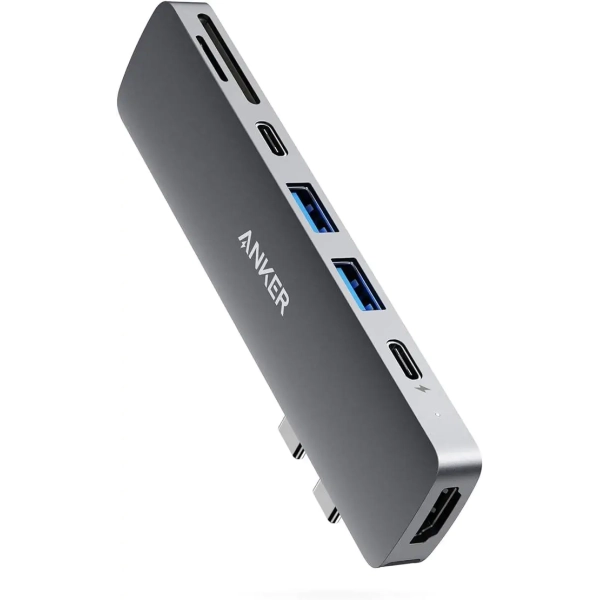
| Output Interface | Seven-port USB 3.0 Type-C hub features 1 Thunderbolt USB-C port, 1 USB-C data port, 2 USB-A ports, 1 HDMI port, 1 SD card slot, and 1 microSD card slot. | |
| Supported System | MacBook | |
| Physical Specification | ||
| Color | Gray | |
The Anker PowerExpand Direct 7-Port USB-C Hub is a compact, convenient accessory that gives a MacBook (or other USB-C laptop) significantly more connectivity. It combines useful ports — like USB, HDMI, SD card reader — into a small device that plugs directly into your laptop, making it easier to connect multiple peripherals. For many users (students, professionals, photographers) — especially in Bangladesh — it’s a highly practical and affordable way to extend functionality without bulky docks.
Full set of ports: It typically adds 1 Thunderbolt/USB-C port, 1 USB-C data port, 2 USB-A ports, 1 HDMI port, 1 SD slot, and 1 microSD slot. This setup is enough to connect external drives, flash drives, keyboard/mouse, monitors, SD/memory-card devices, etc. IT Source+1
Fast data transfer and display support: USB 3.0 gives good transfer speeds; HDMI (or USB-C/Thunderbolt) supports video output. According to BD retailers, the hub supports data transfers and external video output — useful for connecting external monitors or projectors. IT Source+1
Portable and practical: Its compact and lightweight design makes it travel-friendly; this is convenient for students or people who carry their MacBook around. BD stores list this hub as a “plug-and-play” option for laptop users. Rio International+1
What Could Be Better (Limitations & Considerations)
Shared ports and limitations: Although the hub offers many ports, the functions may share resources. For example, when using pass-through charging plus external display plus multiple devices, performance may be reduced compared to a full docking station. Some users of similar hubs report that USB-A ports are “data only,” not suitable for heavy power draw. Anker+2Reddit+2
No Ethernet port or some advanced features: This hub doesn’t include a wired LAN (Ethernet) port — so if you need stable wired internet, you’ll need a separate adapter. Rio International+1
HDMI / video limitations: While it supports video output, the HDMI port (on many similar hubs) tends to support only standard refresh (e.g. 4K@30Hz), which may not be ideal for high-refresh displays or gaming/graphics work. IT Source+1
Uses both USB-C ports on MacBook: The hub attaches to two USB-C/Thunderbolt ports — which means you may lose those direct ports for other accessories or chargers. IT Source+1
Mixed feedback for heavy loads: Some users (especially power users or those using multiple peripherals) say performance can get imperfect under heavy load: ports may disconnect or data transfer slows down. Reddit+1
This hub makes sense for:
Students or professionals who use a MacBook for everyday tasks — browsing, writing documents, presentations — and need extra ports for USB drives, mouse/keyboard, projectors, SD/memory-card readouts.
Photographers or content creators who sometimes need to transfer photos/videos from SD or microSD cards and connect to external displays (monitors, projectors).
People who travel or move around with their laptop and want a compact, plug-and-play solution instead of a full docking station.
Users in Bangladesh who want a fairly priced, genuine hub as an affordable way to expand their MacBook’s capabilities.
The Anker PowerExpand Direct 7-Port Hub is a solid, practical, and cost-effective solution if you want to extend your MacBook’s connectivity without investing in a bulky dock. It won’t replace a full docking station — especially if you need Ethernet, multiple monitors at high refresh rates, or heavy-power peripherals. But for everyday use, simple external drives, monitors or SD-card work, it delivers very well. For many users, especially students or regular laptop users, this hub is a reliable four-star-level accessory.
If you like, I can check real user reviews from Bangladesh of this hub — to see if people there had issues with heat, compatibility, or durability.
Get specific details about this product from customers who own it.
| Basic Information | ||
| Input Interface | Type C | |
| Output Interface | Seven-port USB 3.0 Type-C hub features 1 Thunderbolt USB-C port, 1 USB-C data port, 2 USB-A ports, 1 HDMI port, 1 SD card slot, and 1 microSD card slot. | |
| Supported System | MacBook | |
| Physical Specification | ||
| Color | Gray | |
The Anker PowerExpand Direct 7-Port USB-C Hub is a compact, convenient accessory that gives a MacBook (or other USB-C laptop) significantly more connectivity. It combines useful ports — like USB, HDMI, SD card reader — into a small device that plugs directly into your laptop, making it easier to connect multiple peripherals. For many users (students, professionals, photographers) — especially in Bangladesh — it’s a highly practical and affordable way to extend functionality without bulky docks.
Full set of ports: It typically adds 1 Thunderbolt/USB-C port, 1 USB-C data port, 2 USB-A ports, 1 HDMI port, 1 SD slot, and 1 microSD slot. This setup is enough to connect external drives, flash drives, keyboard/mouse, monitors, SD/memory-card devices, etc. IT Source+1
Fast data transfer and display support: USB 3.0 gives good transfer speeds; HDMI (or USB-C/Thunderbolt) supports video output. According to BD retailers, the hub supports data transfers and external video output — useful for connecting external monitors or projectors. IT Source+1
Portable and practical: Its compact and lightweight design makes it travel-friendly; this is convenient for students or people who carry their MacBook around. BD stores list this hub as a “plug-and-play” option for laptop users. Rio International+1
What Could Be Better (Limitations & Considerations)
Shared ports and limitations: Although the hub offers many ports, the functions may share resources. For example, when using pass-through charging plus external display plus multiple devices, performance may be reduced compared to a full docking station. Some users of similar hubs report that USB-A ports are “data only,” not suitable for heavy power draw. Anker+2Reddit+2
No Ethernet port or some advanced features: This hub doesn’t include a wired LAN (Ethernet) port — so if you need stable wired internet, you’ll need a separate adapter. Rio International+1
HDMI / video limitations: While it supports video output, the HDMI port (on many similar hubs) tends to support only standard refresh (e.g. 4K@30Hz), which may not be ideal for high-refresh displays or gaming/graphics work. IT Source+1
Uses both USB-C ports on MacBook: The hub attaches to two USB-C/Thunderbolt ports — which means you may lose those direct ports for other accessories or chargers. IT Source+1
Mixed feedback for heavy loads: Some users (especially power users or those using multiple peripherals) say performance can get imperfect under heavy load: ports may disconnect or data transfer slows down. Reddit+1
This hub makes sense for:
Students or professionals who use a MacBook for everyday tasks — browsing, writing documents, presentations — and need extra ports for USB drives, mouse/keyboard, projectors, SD/memory-card readouts.
Photographers or content creators who sometimes need to transfer photos/videos from SD or microSD cards and connect to external displays (monitors, projectors).
People who travel or move around with their laptop and want a compact, plug-and-play solution instead of a full docking station.
Users in Bangladesh who want a fairly priced, genuine hub as an affordable way to expand their MacBook’s capabilities.
The Anker PowerExpand Direct 7-Port Hub is a solid, practical, and cost-effective solution if you want to extend your MacBook’s connectivity without investing in a bulky dock. It won’t replace a full docking station — especially if you need Ethernet, multiple monitors at high refresh rates, or heavy-power peripherals. But for everyday use, simple external drives, monitors or SD-card work, it delivers very well. For many users, especially students or regular laptop users, this hub is a reliable four-star-level accessory.
If you like, I can check real user reviews from Bangladesh of this hub — to see if people there had issues with heat, compatibility, or durability.
Get specific details about this product from customers who own it.